Audio to Text Converter
Convert any audio file to text online. Accurate AI transcription with timestamps, free to try.
Free without sign-up: 1 file per day, up to 10 minutes. Audio is deleted automatically after 7 days.
- Audio and video files, up to 10 hours on Pro
- 20 languages, or automatic detection
- Export TXT, Word, SRT, VTT and JSON
- Audio deleted after 7 days
Convert audio to text in three steps
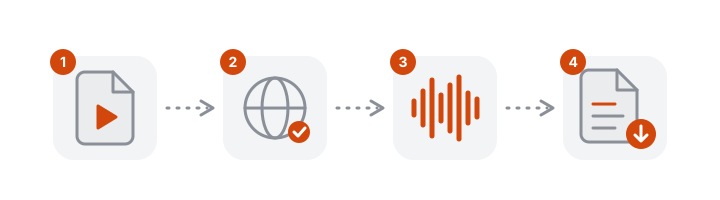
- Add your file. Drop an audio file into the converter above or click to choose one.
- Set the language. Select the spoken language, or let VoceText detect it.
- Take the text. Copy it, or download TXT, SRT, VTT or JSON.
Which audio files work
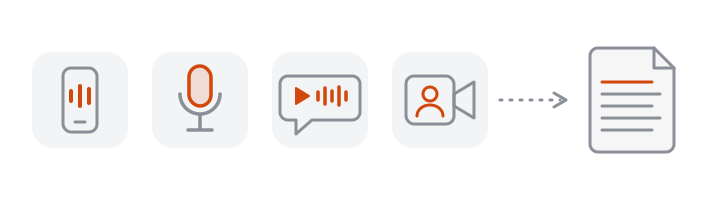
You do not need to know what format your recording is in. These are the files people most often convert:
| Where the recording comes from | Usual format |
|---|---|
| iPhone Voice Memos | M4A |
| Android voice recorder | M4A, AAC or OGG |
| WhatsApp voice notes | Opus (OGG) |
| Podcast episodes and downloads | MP3 |
| Handheld recorders | WAV or MP3 |
| Saved Zoom, Meet or Teams audio | M4A or MP4 |
If a file will not open, try Chrome or Edge, which read the widest range of formats.
What you get
- A timestamp on every passage, so you can jump to any moment in the recording.
- Punctuation and capitalization added automatically.
- An editor to fix names and technical terms before you export, with a free account or Pro.
- Subtitle files (SRT and VTT) ready for YouTube, Premiere Pro or any video player.
Tips for the best results
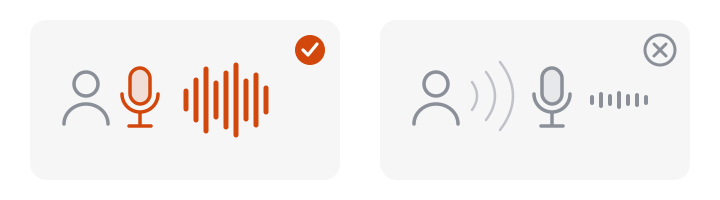
- Get close to the speaker. Distance and room echo cost more accuracy than any file format.
- Select the language when you know it. This avoids misdetection on short clips.
- Keep the original file. Re-encoding or speeding up a recording before upload does not help and can remove detail.
- Check names and numbers. These are where speech recognition is most often wrong, and the timestamps make them quick to verify.
Languages you can convert
Select the language spoken in the recording: English, Spanish, Portuguese, German, Italian, French, Dutch, Polish, Swedish, Russian, Ukrainian, Turkish, Arabic, Hindi, Japanese, Korean, Chinese, Vietnamese, Thai and Indonesian. Automatic detection is available when you are not sure. The text is written in the language that is spoken; VoceText does not translate.
What to do with the text
- Paste it into a document. Copy the whole transcript with one click, or download TXT.
- Pull out quotes. Each passage has a timestamp, so you can confirm the exact wording against the audio.
- Make the recording searchable. Search the transcript for a name or topic instead of scrubbing through the audio.
- Publish it. Use the text as show notes, a blog draft or an accessible version of an episode.
If the conversion does not work
| What you see | What to do |
|---|---|
| The file cannot be read | Open the page in Chrome or Edge, or convert the file to MP3 |
| The file is longer than your plan allows | Sign up for a free account for 30 minutes, or use Pro for up to 10 hours |
| You have reached today's file limit | Limits reset at midnight UTC |
| The text is in the wrong language | Start again and select the language instead of automatic detection |
What happens to your audio

Your browser compresses the audio before it is uploaded. The audio is stored only to produce the transcript and to let you play it back while you check the text, then deleted automatically after 7 days. Recordings are not used to train AI models. Details are in the privacy policy.
Free and Pro limits at a glance
| Without an account | Free account | Pro | |
|---|---|---|---|
| Price | Free | Free | $10/month or $96/year |
| Files per day | 1 | 3 | No daily limit |
| Longest file | 10 minutes | 30 minutes | 10 hours |
| Monthly allowance | Daily limit only | 10 hours | 100 hours |
| Speaker identification | Not included | Not included | Up to 10 hours per month |
| Edit and save transcripts | Not included | Included | Included |
| Download formats | TXT, DOCX, SRT, VTT, JSON | TXT, DOCX, SRT, VTT, JSON | TXT, DOCX, SRT, VTT, JSON |
| Transcripts kept for | 24 hours | 30 days | Until you delete them |
Frequently asked questions
How do I convert audio to text?
Upload your audio file above, choose the language or leave it on automatic detection, and click Transcribe. The text appears with a timestamp on every passage when processing finishes.
Can I convert audio to text for free?
Yes. One file per day of up to 10 minutes is free without an account. A free account allows 3 files per day of up to 30 minutes each, up to 10 hours per month.
What audio formats are supported?
MP3, M4A, WAV, OGG, Opus, FLAC, AAC and most other common formats. Video files work too.
How long can the audio file be?
Up to 10 minutes without an account, 30 minutes with a free account and 10 hours per file on Pro. The limit is the length of the recording, not the size of the file.
Can I edit the text after conversion?
Yes. Signed-in users can correct the transcript in the editor, click any timestamp to hear that moment, and save the result.
Does it work on a phone?
Yes. The converter runs in the browser on iPhone and Android. Choose a voice memo or any audio file from your phone's files, and download the text when it is ready.
Can it convert a song to lyrics?
It is built for speech. Singing over music is recognised much less reliably than someone talking, so expect gaps and wrong words in lyrics.
Do I need to convert my file to MP3 first?
No. Upload the file as it is. Your browser reads the original format and prepares the audio itself.
How accurate is the audio to text converter?
Clear speech recorded close to the microphone usually needs only light corrections. So far we have tested accuracy only on short clips of computer-generated speech, which came back with few or no word errors. Real recordings are harder: expect more corrections with background noise, phone-quality audio or overlapping voices.
Can I convert several audio files at once?
Files are converted one at a time. Start the next file as soon as the previous one has been uploaded.