Transcribe Audio to Text Online
Fast, accurate AI transcription for interviews, meetings, lectures and podcasts.
Free without sign-up: 1 file per day, up to 10 minutes. Audio is deleted automatically after 7 days.
- Audio and video files, up to 10 hours on Pro
- 20 languages, or automatic detection
- Export TXT, Word, SRT, VTT and JSON
- Audio deleted after 7 days
Transcription for every kind of recording
Interviews. Get a timestamped transcript you can quote accurately, with speaker labels on Pro.
Meetings. Turn recorded calls into searchable notes and find the decisions, owners and dates.
Lectures. Study from a written copy of every class instead of rewinding the recording.
Podcasts. Publish show notes and accessible transcripts for every episode.
From recording to finished transcript
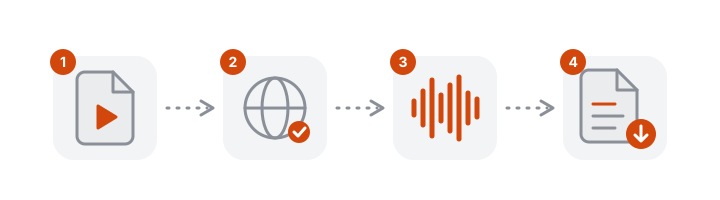
- Upload the recording. Audio and video files both work.
- Read the draft. The text arrives with punctuation, paragraphs and a timestamp on each passage.
- Review while listening. Click a timestamp to hear that moment and correct the text in the editor.
- Export. Download TXT for documents, SRT or VTT for subtitles, or JSON for structured data.
What to check in an automatic transcript
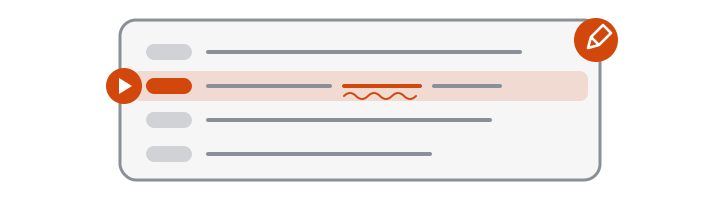
A clear recording needs little correction, and the errors that remain tend to fall in the same places:
- Names of people, places and products
- Numbers, dates and amounts
- Specialist terms and abbreviations
- Moments when two people speak at once
- Speaker labels around quick exchanges
Checking these five spots catches most of what matters.
Telling speakers apart
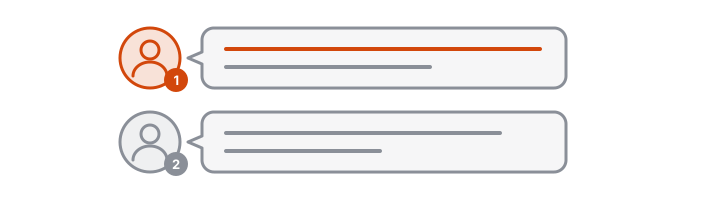
On Pro, turn on Identify speakers before you start. Each paragraph is labelled with a speaker number, which you can use to follow who said what in an interview or meeting. Labels are assigned from the voices in the recording; they are most reliable when people take turns.
Clean or verbatim?
An automatic transcript is close to clean verbatim: it keeps what was said, in the speaker's own words, with punctuation added. It does not tidy grammar or summarise. Very short fillers are often dropped and false starts may be shortened.
- For notes, articles and subtitles, use the transcript as it is after a quick review.
- For quotations, check the passage against the audio by clicking its timestamp.
- For strict verbatim work, such as some research and legal records, listen through and restore fillers and repetitions in the editor.
A workflow for interviews
- Record close to both speakers. One phone on the table between you is enough.
- Upload the file as soon as the interview ends, with the language selected.
- Skim the transcript and mark the passages you plan to use.
- Verify each quote by playing it from its timestamp, and fix names and figures.
- Export TXT for your draft and keep the timestamps for reference.
How AI transcription works
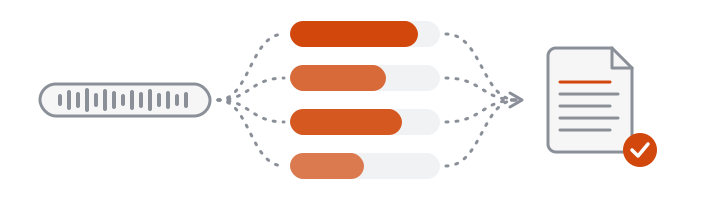
VoceText prepares the audio in your browser, removes silent passages, and sends it to a Whisper speech recognition model. Long recordings are split into segments and transcribed in parallel, then merged into one transcript. In pre-launch tests, single recordings of 5 to 30 minutes were transcribed 11 to 16 times faster than they play.
Free and Pro limits at a glance
| Without an account | Free account | Pro | |
|---|---|---|---|
| Price | Free | Free | $10/month or $96/year |
| Files per day | 1 | 3 | No daily limit |
| Longest file | 10 minutes | 30 minutes | 10 hours |
| Monthly allowance | Daily limit only | 10 hours | 100 hours |
| Speaker identification | Not included | Not included | Up to 10 hours per month |
| Edit and save transcripts | Not included | Included | Included |
| Download formats | TXT, DOCX, SRT, VTT, JSON | TXT, DOCX, SRT, VTT, JSON | TXT, DOCX, SRT, VTT, JSON |
| Transcripts kept for | 24 hours | 30 days | Until you delete them |
Frequently asked questions
What is the best way to transcribe audio to text?
Use an AI transcription tool for a fast first draft, then review it. VoceText produces a timestamped transcript and lets you correct it while listening to the audio.
How long can my audio be?
Up to 10 minutes without an account, 30 minutes on the free plan and up to 10 hours per file on Pro.
Does it work for interviews with several people?
Yes. The transcript captures everyone who speaks. Pro users can also turn on speaker identification to label who said what, for up to 10 hours of audio per month.
Is my audio private?
Your audio is used only to create your transcript and is deleted automatically after 7 days. It is not used to train AI models.
How does AI transcription compare with typing it out?
Typing a recording by hand usually takes several times its length. An automatic transcript is ready much sooner, and reviewing it takes roughly the length of the recording when the audio is clear.
Is the transcript word for word?
It follows what was said closely, including most repeated words. Very short fillers such as um are often left out, and inaudible passages may be missing, so check against the audio if you need a strict verbatim record.
Can I use it for research interviews?
Yes. Each passage has a timestamp, so you can check a quotation against the recording before you cite it. Review your own consent and data rules before uploading interviews with participants.
How accurate is AI transcription?
Clear speech recorded close to the microphone usually needs only light corrections. So far we have tested accuracy only on short clips of computer-generated speech, which came back with few or no word errors. Real recordings are harder: expect more corrections with background noise, phone-quality audio or overlapping voices.
Can I transcribe in a language other than English?
Yes. Select one of 20 languages or let VoceText detect it. The transcript is written in the language spoken.