M4A to Text Converter
Turn an M4A file or an iPhone voice memo into a timestamped transcript. No conversion to MP3 needed.
Free without sign-up: 1 file per day, up to 10 minutes. Audio is deleted automatically after 7 days.
- Audio and video files, up to 10 hours on Pro
- 20 languages, or automatic detection
- Export TXT, Word, SRT, VTT and JSON
- Audio deleted after 7 days
How to convert M4A to text
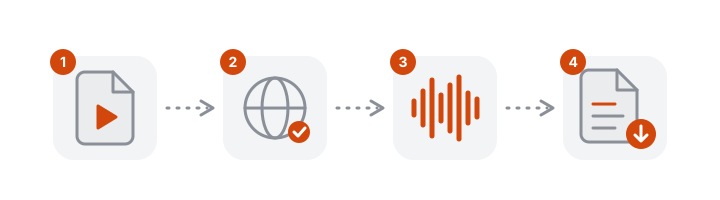
- Choose the M4A. Drop it into the box above or pick it from your files.
- Check the language. Select it when you know it, especially for short memos.
- Transcribe. The text arrives with punctuation and timestamps.
- Download. TXT, Word, SRT, VTT or JSON.
Transcribe an iPhone voice memo
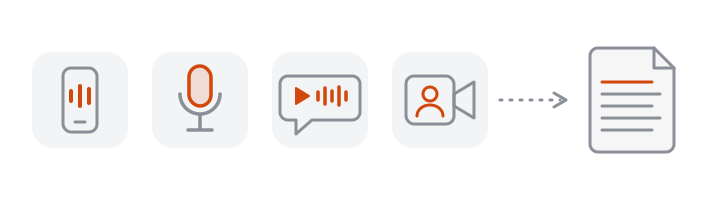
Voice Memos saves recordings as M4A. To transcribe one on your phone:
- Open Voice Memos and tap the recording.
- Tap the More button, then Share, then Save to Files, and choose a folder.
- Open this page in Safari, tap the upload box and pick the memo from Files.
The steps follow Apple's guide to exporting a Voice Memos recording; menu names can differ slightly between iOS versions.
When the built-in transcript is not enough
Recent iPhones can show a transcript inside Voice Memos. Upload the file here when you need:
- A file, not just text on screen: Word, TXT, or subtitles with timing.
- Timestamps on every passage to quote or find a moment later.
- Two or more speakers labelled, for interviews and meetings (Pro).
- A language or device the built-in feature does not cover.
- Long recordings: up to 10 hours per file on Pro.
What M4A is
M4A is an audio-only MPEG-4 file, usually compressed with AAC. It is the default format for iPhone Voice Memos and common on Android recorders and in meeting apps that save audio separately. VoceText reads it directly; there is nothing to convert.
Tips for clearer voice memos
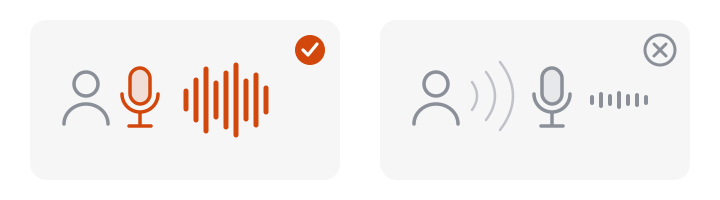
- Hold the phone close, as you would for a call, or place it near the person speaking.
- Pause between thoughts; pauses help split the text into clear passages.
- Select the language for short memos instead of relying on detection.
Your recordings and privacy
Voice memos are often personal. Audio is deleted automatically after 7 days, transcripts made without an account after 24 hours, and recordings are not used to train AI models.
Free and Pro limits at a glance
| Without an account | Free account | Pro | |
|---|---|---|---|
| Price | Free | Free | $10/month or $96/year |
| Files per day | 1 | 3 | No daily limit |
| Longest file | 10 minutes | 30 minutes | 10 hours |
| Monthly allowance | Daily limit only | 10 hours | 100 hours |
| Speaker identification | Not included | Not included | Up to 10 hours per month |
| Edit and save transcripts | Not included | Included | Included |
| Download formats | TXT, DOCX, SRT, VTT, JSON | TXT, DOCX, SRT, VTT, JSON | TXT, DOCX, SRT, VTT, JSON |
| Transcripts kept for | 24 hours | 30 days | Until you delete them |
Frequently asked questions
How do I convert M4A to text?
Drop the M4A file into the converter above, check the language and click Transcribe. The transcript appears with a timestamp on every passage, ready to copy or download.
Do I need to convert M4A to MP3 first?
No. VoceText reads M4A directly. Converting first adds a step and can only lose quality.
How do I get a voice memo off my iPhone?
In Voice Memos, open the recording, tap the More button, tap Share, then Save to Files. Then open this page in Safari, tap the upload box and choose the file from Files. The exported file is an M4A.
How long can the M4A be?
Up to 10 minutes without an account, 30 minutes with a free account and 10 hours on Pro.
My iPhone already transcribes voice memos. Why use this?
The built-in transcript is handy for reading on the phone. Use VoceText when you need the text as a file with timestamps, subtitles, a Word document, speaker labels for an interview, or when your iPhone model or language is not covered by the built-in feature.
Can it tell two speakers apart in a voice memo?
Yes, on Pro. Turn on speaker identification before you start and each change of speaker is labelled.
Which apps save M4A files?
iPhone Voice Memos, many Android recorders, Zoom's separate audio file and GarageBand exports, among others.