Interview Transcription
Transcribe research, journalism and job interviews with timestamps and speaker labels, review them while listening, and export to Word.
Free without sign-up: 1 file per day, up to 10 minutes. Audio is deleted automatically after 7 days.
- Audio and video files, up to 10 hours on Pro
- 20 languages, or automatic detection
- Export TXT, Word, SRT, VTT and JSON
- Audio deleted after 7 days
How to transcribe an interview
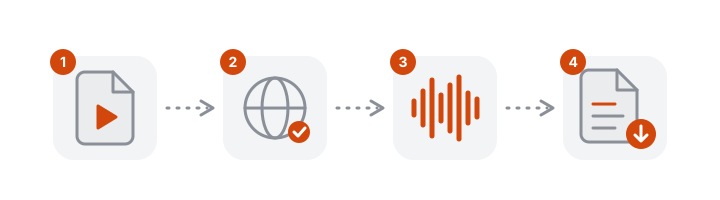
- Upload the recording. Audio from your phone or recorder, or the video of a call.
- Turn on speaker identification (Pro) to separate interviewer and interviewee.
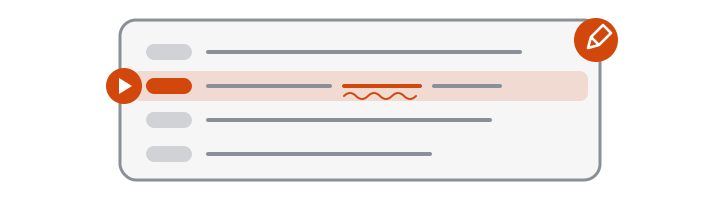
- Review while listening. Click a timestamp to hear a passage and fix names, terms and speaker labels.
- Export to Word to keep working in a document, or TXT to paste into your notes.
See a real interview, before and after review
The homepage has a real two-person oral history interview, transcribed with Pro speaker identification. It opens on the original output, exactly as VoceText returned it, and switches to the reviewed version. The corrected lines are explained: a misheard name, a place name, and a two-word reply that was attributed to the interviewer. Those are the kinds of corrections to expect in your own interviews.
A workflow for research interviews
- Record close to both people. One phone on the table between you is enough.
- Transcribe soon after the interview, with the language selected.
- Read the whole transcript while listening and correct names, numbers and terms.
- Replace participants' names with codes (P1, P2…) if your study must be anonymised.
- Mark what you cannot hear as [inaudible] instead of guessing.
- Export to Word and keep the original recording with the reviewed transcript.
What to check before you quote
- Names of people, places and organisations
- Numbers, dates and amounts
- Specialist terms and abbreviations
- Short replies and interruptions, where the speaker label can be wrong
- Moments when two people speak at once
Clean or verbatim?
| Clean verbatim | Strict verbatim | |
|---|---|---|
| What it keeps | What was said, with punctuation | Also hesitations, repetitions and pauses |
| Typical use | Journalism, reports, most theses | Conversation and discourse analysis |
| With VoceText | The transcript is close to this; review while listening | Use it as a base and add the marks in the editor |
Job interviews and journalism
- Hiring: keep a written record of candidate interviews to compare answers fairly. Tell candidates you are recording.
- Journalism: quote accurately, with the timestamp of every quote noted for fact-checking.
Participant data and privacy
The audio is prepared in your browser, deleted automatically after 7 days and not used to train AI models. On Pro, transcripts are kept until you delete them. Check your consent form, ethics approval and data protection rules before you upload participant recordings.
Free and Pro limits at a glance
| Without an account | Free account | Pro | |
|---|---|---|---|
| Price | Free | Free | $10/month or $96/year |
| Files per day | 1 | 3 | No daily limit |
| Longest file | 10 minutes | 30 minutes | 10 hours |
| Monthly allowance | Daily limit only | 10 hours | 100 hours |
| Speaker identification | Not included | Not included | Up to 10 hours per month |
| Edit and save transcripts | Not included | Included | Included |
| Download formats | TXT, DOCX, SRT, VTT, JSON | TXT, DOCX, SRT, VTT, JSON | TXT, DOCX, SRT, VTT, JSON |
| Transcripts kept for | 24 hours | 30 days | Until you delete them |
Frequently asked questions
How do I transcribe an interview?
Upload the recording above. On Pro, turn on speaker identification before you start. When the transcript is ready, review it while listening and download Word or TXT.
Can it tell the interviewer and the interviewee apart?
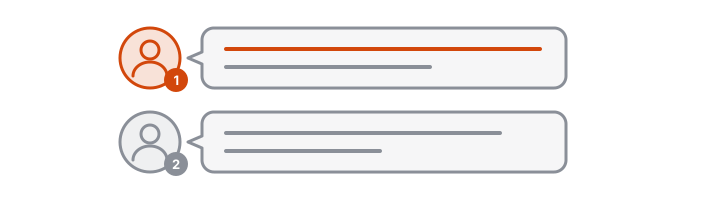
Yes, on Pro. Speaker identification labels each change of speaker as Speaker 1, Speaker 2 and so on. Check short replies, such as a one-word answer or a name, which can be attributed to the wrong person.
Is it good enough for research or a dissertation?
As a first draft. Every passage has a timestamp, so you can check each quotation against the recording. Read the whole transcript while listening before you use it; an unchecked automatic transcript does not replace the review your method requires.
Can I export the interview to Word?
Yes. Choose Word (DOCX) in the Download menu: each paragraph carries its timestamp and speaker number.
Is the transcript verbatim?
It follows what was said closely, but very short fillers may be dropped. If your method needs strict verbatim with pauses and hesitations, add them in the editor while listening.
How long can an interview be?
Up to 10 minutes without an account, 30 minutes with a free account and 10 hours per file on Pro, with 100 hours of transcription per month.
What about participant data?
Audio is deleted automatically after 7 days and recordings are not used to train AI models. Check your consent form, your ethics approval and your data protection rules before uploading participant recordings.
Can I transcribe a Zoom or Teams interview?
Yes. Download the recording from the meeting app and upload it here.