
Best Free Online Audio Transcription Tools in 2026 (Free Tiers Checked)
November 2026 comparison of free audio-to-text tools—sign-up rules, real file and minute caps, watermarks, Word & SRT exports, and local vs cloud speed.
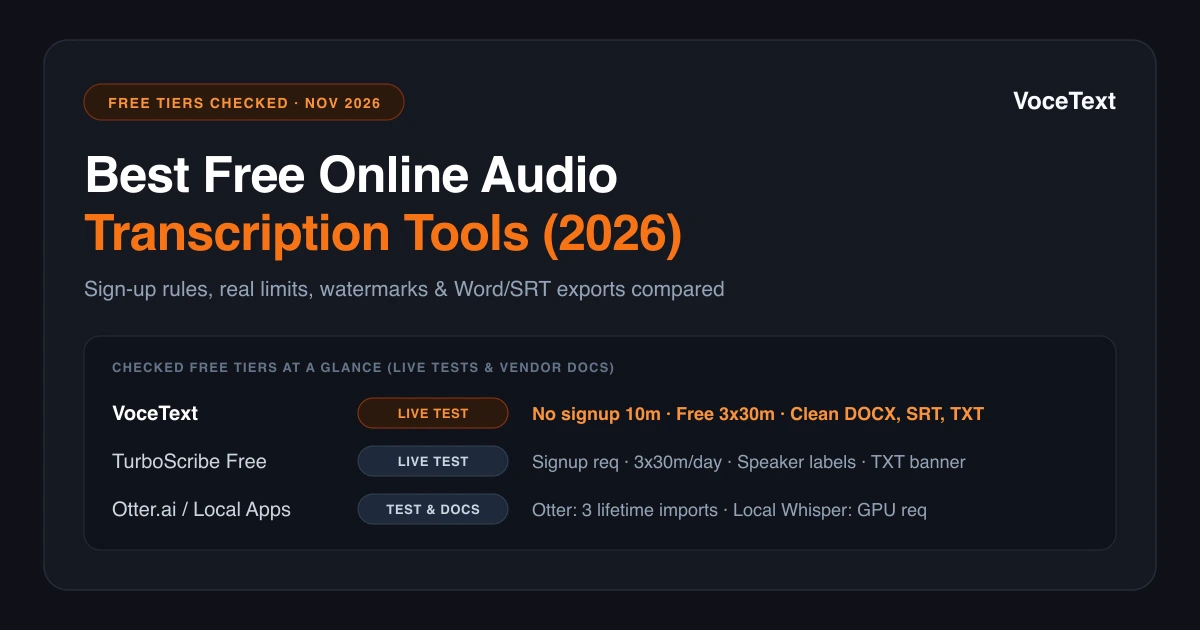
Many "free" online transcription tools bury their real limits until after you create an account or wait through a slow video upload—locking Word or SRT exports behind a paywall, cutting transcripts off mid-file, or stamping branding lines into your download.
This guide compares the free tiers checked in November 2026 across the most recommended audio-to-text tools, including our own product (VoceText). Three tools (VoceText, TurboScribe Free and Otter.ai Basic) were tested hands-on on identical public recordings; the remaining tools reflect published vendor limits checked in November 2026 and are labelled clearly in the table below. Where another tool beats VoceText—such as unlimited offline transcription or free speaker labels—we state that plainly.
Quick verdict: which free tool fits your job?
| What you need | Best free choice (Nov 2026) | Why |
|---|---|---|
| Fast browser transcription on any phone or laptop + free Word (DOCX) & SRT | VoceText | No sign-up for 10-min clips (3×30 min with free account), no ~100–800 MB model download, video frames stay local, watermark-free DOCX/SRT/TXT/VTT/JSON |
| Unlimited free, 100% offline/local on a fast computer | OpenAI Whisper / MacWhisper / local WebGPU apps (e.g. EarScribe, OpenSubs) | Zero upload and no minute caps once the model downloads to your GPU/CPU |
| Free online tool with no stated cap (TXT/SRT only) | Riverside Transcriber | Free standalone browser tool, 100+ languages, TXT & SRT (no Word export or free speaker labels) |
| Free speaker labels on multi-speaker files (with sign-up) | TurboScribe Free | 3 files/day up to 30 min each, includes speaker recognition and PDF/DOCX export (TXT has a free banner line) |
| Live meeting notes & AI summaries (not file uploads) | Otter.ai Basic | Built for live Zoom/Meet/Teams calls (note: Basic caps uploaded files at 3 lifetime imports and TXT-only) |
Free tiers compared side by side (checked November 2026)
| Tool | How checked | Sign-up needed? | Free limit | Free export formats | Watermark / catch | Speaker labels on Free? |
|---|---|---|---|---|---|---|
| VoceText | Live test (23 Nov 2026) | No (guest); optional free account | Guest: 1 file/day, 10 min Free acct: 3 files/day, 30 min/file, 10 hrs/mo | TXT, Word (DOCX), SRT, VTT, JSON | None (all exports clean; 20 languages; no translation) | No (Pro: $10/mo, up to 10 hrs/mo) |
| TurboScribe Free | Live test (23 Nov 2026) | Yes (Google or email) | 3 files/day, up to 30 min each, 1 file at a time | DOCX, PDF, SRT, VTT, TXT | Free-tier banner line in TXT export; uploads full video | Yes (supports setting speaker count) |
| Otter.ai Basic | Live test (23 Nov 2026) | Yes | 300 min/mo, 30 min/conversation, 3 lifetime file imports | TXT only | DOCX, PDF & SRT locked to Pro; stopped at 10:40 on our 24-min MP4 test | Yes |
| Riverside Transcriber | Vendor docs (Nov 2026) | No | No published cap on standalone web tool | TXT, SRT | No Word (DOCX) export; no built-in transcript library | No (single-speaker on standalone tool) |
| Notta Free | Vendor docs (Nov 2026) | Yes | 120 min/mo, 3-minute cap per conversation | Limited on Free | 3-minute per-file cap makes full interviews impractical | Yes (within 3-min cap) |
| Local browser WebGPU tools (e.g. EarScribe, OpenSubs, TranscriptBalance) | Vendor docs (Nov 2026) | No | Unlimited (bound by your device RAM/GPU) | Usually TXT, SRT, VTT (DOCX varies) | Requires downloading ~100–800 MB model weights; slow or unsupported on phones / non-GPU laptops | Usually No |
| OpenAI Whisper / MacWhisper (free) | Vendor docs (Nov 2026) | No | Unlimited offline on your machine | TXT, SRT, VTT | Requires desktop installation; MacWhisper is macOS-only | Usually No (or Pro add-on) |
Disclosure: VoceText is our own service. TurboScribe Free and Otter.ai Basic were tested hands-on on 23 November 2026 on identical public recordings; all other rows reflect published vendor documentation checked in November 2026.
Tool-by-tool breakdown
1. VoceText — best hybrid browser tool for fast video/audio uploads and free Word (DOCX) & SRT
- How it works: Your browser extracts and compresses the audio track to Ogg/Opus locally (so video frames never leave your device), strips silent stretches, and runs parallel Whisper
large-v3-turboon the server. - Free tier (tested live): 1 file/day up to 10 minutes with no sign-up, no credit card and no watermark. A free account raises that to 3 files/day up to 30 minutes each (10 hours/month) with an interactive timestamp editor.
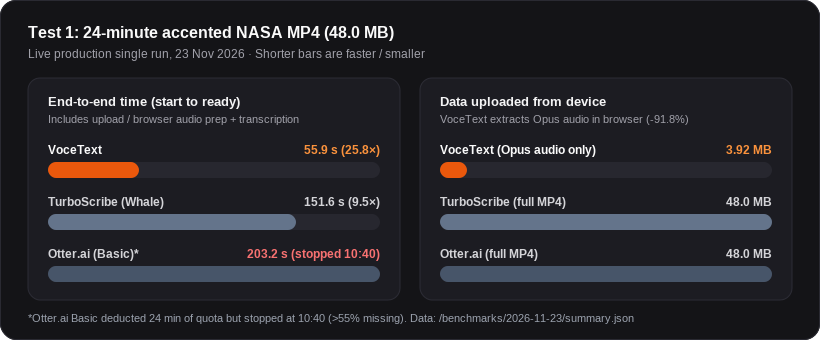
- Where it shines: Works smoothly on modern mobile browsers and older laptops without downloading a ~100–800 MB local GPU model; exports clean TXT, Microsoft Word (DOCX), SRT, VTT and JSON on every tier; uploaded only 3.92 MB from a 48 MB 24-minute NASA MP4 and finished in 55.9 seconds (4.17% WER) in our live benchmark.
- Where it falls short: Supports 20 languages (fewer than 99-language Whisper wrappers), does not translate or burn captions into video, and reserves speaker identification for Pro ($10/month, up to 10 hours/month).
Try VoceText free online, or go directly to MP3 to Text, Audio to Word or Video to SRT.
2. Local browser WebGPU tools & desktop Whisper (OpenSubs, EarScribe, MacWhisper, Whisper CLI)
- Best for: Privacy-first users and heavy users with a modern laptop or Apple Silicon Mac who want unlimited free transcription with zero server upload.
- The trade-off most lists skip: Local Whisper weights run ~100–800 MB (~100 MB for small models up to ~750–800 MB for
large-v3-turbo) and need WebGPU or a fast local CPU/GPU. On mobile browsers or older office laptops, local browser tools either fall back to tiny, less accurate models or stall on 20–30 minute recordings.
3. Riverside Free Transcriber
- Best for: Quick, no-signup single-speaker transcriptions when you want 100+ languages and only need TXT or SRT.
- Limitations: No Microsoft Word (
.docx) export and no speaker separation in its standalone free transcriber.
4. TurboScribe Free
- Best for: Free speaker identification and PDF export if you do not mind creating an account and uploading up to 3 files/day (30 minutes each).
- Live benchmark note: In our 23 November 2026 benchmark, TurboScribe Free (Whale mode) matched VoceText closely on the 24-minute NASA MP4 (3.91% WER vs VoceText's 4.17%, though slower at 151.6 s vs 55.9 s) and beat both VoceText and Otter.ai on a heavily accented 2-speaker Lancashire interview (11.15% WER, 0.18% speaker word error). Its free TXT download includes a short promotional banner line. See VoceText vs TurboScribe.
5. Otter.ai Basic
- Best for: Live Zoom, Meet and Teams meeting capture with automatic notes and summaries.
- Limitations for file uploads: Basic caps uploaded audio/video files at 3 lifetime imports, locks DOCX/PDF/SRT exports to Pro, and in our 23 November 2026 run on a 24-minute MP4, Otter.ai Basic deducted 24 monthly minutes yet silently stopped transcribing at 10:40. See VoceText vs Otter.ai.
6. Notta Free
- Best for: Short multilingual dictation tests or quick clips if you already use Notta's meeting ecosystem.
- Limitations: Although Notta advertises 120 free minutes per month, its 3-minute cap per conversation/recording rules out full meetings, podcasts or interviews on the free tier.
Live benchmark highlights (23 November 2026)
Instead of guessing accuracy from marketing claims, we timed and ear-audited two public recordings—a 24-minute, 48.0 MB NASA SpaceX Crew-1 MP4 and a 3m 33s reverberant 2-speaker Lancashire oral-history MP3—across VoceText, TurboScribe Free and Otter.ai Basic:
| Recording | VoceText | TurboScribe Free (Whale) | Otter.ai Basic |
|---|---|---|---|
| 24-min NASA MP4 (48 MB) | 55.9 s · 3.92 MB uploaded · 4.17% WER | 151.6 s · 48 MB uploaded · 3.91% WER | 203.2 s · 48 MB uploaded · Stopped at 10:40 |
| 3m 33s Lancashire 2-speaker MP3 | ~18 s (Pro Nova-3) · 18.35% WER · 5.45% speaker error | ~54 s (2 speakers set) · 11.15% WER · 0.18% speaker error | 38.9 s · 14.57% WER · 0.92% speaker error |
Inspect the full ear-audited methodology and downloadable JSON ground truth in the Real-Recording AI Transcription Benchmark.
How to choose by recording length
- Under 10 minutes (quick voice note, clip or short video): Use VoceText without signing up for instant watermark-free TXT, Word or SRT, or Riverside for single-speaker TXT/SRT.
- 10 to 30 minutes (interviews, lectures, YouTube videos): Use a free VoceText account (3 files/day, 10 hrs/mo, fast on any device, clean Word & SRT) or TurboScribe Free (if you need free speaker labels).
- 1 hour or longer: Run OpenAI Whisper / MacWhisper locally for $0 unlimited transcription on your own computer, or use VoceText Pro ($10/month for 100 hrs/mo and files up to 10 hours) if you want fast browser processing without local setup.
Frequently asked questions
What is the best free online audio transcription tool without sign-up?
It depends on your hardware and export needs. For fast browser transcription on phones or everyday laptops with watermark-free Word (DOCX) and SRT exports, VoceText gives 1 file/day up to 10 minutes with no sign-up (and 3×30 min with a free account). For unlimited local transcription on a fast GPU computer, browser-only WebGPU Whisper tools such as EarScribe or OpenSubs run locally with no minute caps. Riverside's standalone transcriber is another no-signup option for TXT and SRT.
Which free transcription tools export to Microsoft Word (DOCX) without a watermark?
VoceText exports watermark-free Word (DOCX), TXT, SRT, VTT and JSON on both its no-signup guest tier and its free account. TurboScribe Free also exports DOCX after sign-up (while adding a free-tier banner line to TXT). Otter.ai Basic and Riverside's free tool do not include free DOCX export.
Which free tools export clean SRT subtitles from video?
VoceText (guest 10 min/file, free account 3×30 min/file, no watermark), OpenSubs (local browser Whisper, no watermark), Riverside Transcriber (TXT/SRT) and TurboScribe Free (requires sign-up) all export clean SRT files. Free tiers of online video editors such as VEED or Kapwing often stamp a watermark onto exported videos even when the SRT file itself is clean.
Should I pick a local browser WebGPU transcriber or a cloud transcriber?
Pick a local browser WebGPU tool or desktop Whisper app if you need strict 100% offline privacy and unlimited hours on a computer with a capable GPU. Pick a hybrid or cloud tool like VoceText if you are on a phone, tablet or older laptop without WebGPU—where downloading a ~100–800 MB model and running it locally is slow or crashes—or when you want consistent 25× real-time speed.
What is the best free option for recordings longer than 1 hour?
For truly unlimited free transcription of multi-hour recordings, install OpenAI Whisper locally (or a desktop wrapper like MacWhisper on macOS or Buzz on Windows/Linux). Most free cloud tiers cap individual uploads at 10–60 minutes; VoceText supports up to 30 minutes on Free and up to 10 hours per file on Pro ($10/month).
How were these free-tier limits checked?
VoceText, TurboScribe Free and Otter.ai Basic were tested hands-on live on 23 November 2026 on identical public recordings. All other tools in the table were checked against their published vendor pages in November 2026 and are labelled accordingly.