
An Otter.ai alternative for transcribing files
Otter.ai is built around live meeting bots; VoceText is built for uploaded audio and video files. Here is how free import limits, exports and live benchmarks compare.
The short answer
- Choose VoceText if you transcribe recorded audio or video files (MP3, M4A, WAV, MP4, MOV, Zoom/Teams recordings), hit Otter Basic's 3 lifetime file import cap, want to try without signing up, need free Microsoft Word (DOCX) or SRT/VTT subtitle exports, or work across 20 languages.
- Choose Otter.ai if you want a live meeting bot that joins Zoom, Google Meet or Microsoft Teams calls automatically, generates live notes and AI summaries during the call, or if you transcribe heavily accented multi-speaker English audio where Otter's diarization outperformed VoceText Pro in our November 2026 test.
Plans and limits side by side
Verified against live web apps and published plans in November 2026:
| VoceText | Otter.ai | |
|---|---|---|
| Try without an account | Yes — 1 file/day, up to 10 min | No (account required) |
| Free file imports | 3 files/day (free account), renewable daily up to 10 hrs/mo | 3 lifetime audio/video file imports on Basic (300 min/mo total) |
| Longest file on Free | 30 minutes (10 min as guest) | 30 minutes per conversation (stopped at 10:40 in our 24-min MP4 test) |
| Free exports | TXT, Word (DOCX), SRT, VTT, JSON — no watermark | TXT only (DOCX, PDF, SRT require Pro) |
| Paid plan | $10/month ($96/year) · 100 hrs/mo, up to 10 hrs/file | Pro: $16.99/mo ($8.33/mo billed yearly) · 1,200 min (20 hrs)/mo, 90 min/conversation |
| Languages | 20 languages (or auto-detect) | Primarily English, Spanish, French and Japanese |
| Speaker identification | Pro (up to 10 hrs/mo) | Included (Basic & paid) |
| Live meeting bot & AI summaries | No (file upload only) | Yes (core feature) |
| Video upload | Only compressed Opus audio leaves your device | Uploads the full video file |
Live real-recording benchmark (23 November 2026)
We ran the exact same two publicly licensed English recordings through VoceText and Otter.ai Basic on 23 November 2026 and scored every output against ear-audited ground truth. Full methodology, downloadable reference JSON files and TurboScribe results are published in our real-recording transcription benchmark.
| Recording | VoceText | Otter.ai (Basic Free) |
|---|---|---|
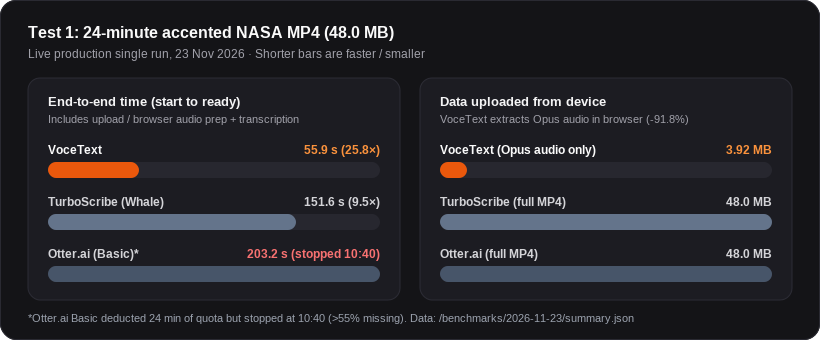
| 24-min NASA MP4 (48.0 MB, Japanese-accented English) | 55.9 s total (3.92 MB Opus uploaded) · Complete (24:04) · 4.17% WER (32 / 768 words) | 203.2 s total (48.0 MB uploaded) · Stopped at 10:40 (>55% missing despite deducting 24 min) · 6.42% WER on Window 1 |
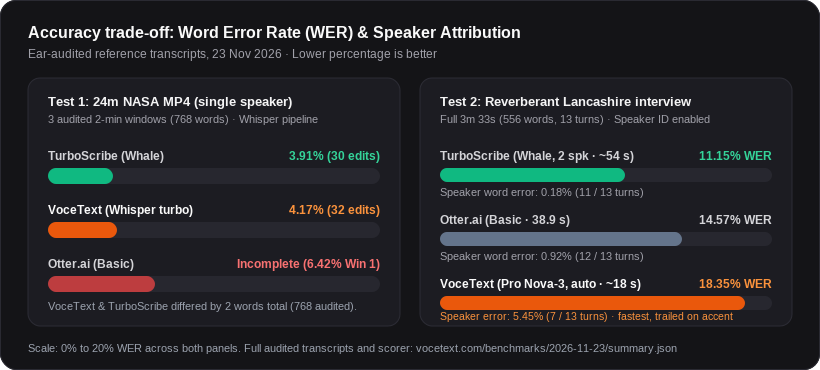
| 3m 33s oral-history MP3 (heavy Lancashire accent, 2 speakers) | ~18 s total (Pro Nova-3, 632 KB uploaded) · 18.35% WER · 5.45% speaker word error | 38.9 s total (3.26 MB uploaded) · 14.57% WER · 0.92% speaker word error |
Two practical takeaways stood out:
- For long uploaded videos and files, VoceText was 3.6× faster and completed the entire recording. Because VoceText extracts Opus audio in your browser (uploading 3.92 MB instead of 48.0 MB) and splits the audio into parallel chunks, it finished the 24-minute MP4 in under a minute and exported TXT, Word, SRT, VTT and JSON cleanly. Otter.ai Basic took 3 minutes 23 seconds, silently truncated the transcript at 10:40, and locked DOCX and SRT exports behind Pro.
- For heavily accented two-speaker English clips with rapid back-and-forth turns, Otter.ai Basic made fewer word and speaker errors. VoceText Pro (Nova-3) finished roughly twice as fast (~18 s vs 38.9 s), but Otter.ai caught more short speaker switches (12/13 turns vs 7/13). We publish this gap openly so you can choose based on your audio rather than marketing claims.
Where VoceText is the better fit
- Uploaded recordings, not live bots: Ideal when you record locally (phone voice memos, Zoom/Teams downloads, camera MP4s, podcasts) and do not want an AI bot joining your calls.
- No 3-file lifetime wall: Free accounts renew every day (3 files/day, 30 minutes each, up to 10 hours/month), and guests can try 1 file/day up to 10 minutes with no account.
- Free Word (DOCX) and SRT/VTT exports: Download clean, watermark-free documents and subtitle files on every tier, including guest mode.
- Higher monthly capacity for solo users: $10/month gives 100 hours/month and up to 10-hour files (compared with Otter Pro's 20 hours/month and 90-minute cap).
- 20 languages: Covers Portuguese, German, Italian, Chinese, Korean, Arabic, Hindi and more beyond Otter's core language list.
Where Otter.ai is the better fit
- Live call capture and summaries: Joins Zoom, Google Meet and Teams meetings automatically, shows live captions and generates structured AI summaries and action items.
- Team collaboration inside meeting notes: Shared workspaces, comments, highlights and CRM/calendar integrations.
- Free speaker labels on short English recordings: Otter includes speaker identification on Basic, whereas VoceText reserves speaker identification for Pro ($10/month, up to 10 hrs/mo).
Compare more free options
Looking at other free transcription tools too? Read our side-by-side comparison of VoceText vs TurboScribe or our 2026 free audio transcription tools guide. You can also test VoceText directly on a short clip below with no sign-up.
Test VoceText on your own recording
Free without sign-up: 1 file per day, up to 10 minutes. Audio is deleted automatically after 7 days.
- Audio and video files, up to 10 hours on Pro
- 20 languages, or automatic detection
- Export TXT, Word, SRT, VTT and JSON
- Audio deleted after 7 days
Frequently asked questions
Why look for an Otter.ai alternative for audio and video files?
Otter.ai Basic caps accounts at 3 lifetime audio/video file imports, 30 minutes per conversation and TXT-only export (DOCX and SRT require a paid plan). In our 23 November 2026 live test on a 24-minute NASA MP4, Otter.ai Basic also stopped transcribing at 10:40 despite deducting all 24 minutes of monthly quota. VoceText focuses on file transcription with daily renewable free quotas and watermark-free TXT, Word (DOCX), SRT, VTT and JSON downloads.
Is VoceText cheaper than Otter.ai?
Yes for solo file transcription. VoceText Pro is $10/month ($96/year) with 100 hours/month and files up to 10 hours. Otter.ai Pro lists at $16.99/month (or $8.33/month billed annually) for 1,200 monthly minutes (20 hours) and 90 minutes per conversation. Check both pricing pages for current rates.
Does VoceText join Zoom, Teams or Google Meet calls as a live bot?
No. VoceText does not join live calls or generate AI meeting summaries. If you want an automatic live meeting notetaker, Otter.ai is built for that job. If you already have saved MP4, M4A, MP3 or WAV recordings and want clean text, Word or SRT files, VoceText is faster and simpler.
Can I try VoceText without creating an account?
Yes. You can transcribe 1 file per day up to 10 minutes without an account and export TXT, Word (DOCX), SRT, VTT or JSON with no watermark. Otter.ai requires an account before you can upload a file.
Which one handles more languages?
VoceText supports 20 languages (including English, Spanish, Portuguese, German, Italian, French, Chinese, Japanese, Korean, Arabic and Hindi). Otter.ai focuses primarily on English, Spanish, French and Japanese.
Which tool was more accurate in your live benchmark?
On a 24-minute accented NASA MP4 video, VoceText finished in 55.9 seconds with 4.17% WER across the full recording, while Otter.ai Basic took 203.2 seconds and stopped at 10:40 (6.42% WER on the first 2-minute window). On a heavily accented 2-speaker Lancashire oral-history MP3 with speaker identification turned on, Otter.ai Basic was more accurate (14.57% WER, 0.92% speaker error in 38.9 s) than VoceText Pro Nova-3 (18.35% WER, 5.45% speaker error in ~18 s).
When were these Otter.ai details checked?
Otter.ai Basic limits, exports, speed and accuracy were verified live on 23 November 2026 during our public real-recording benchmark. Check both sites for the latest pricing before buying.