
Video to SRT Converter
Make SRT subtitles from any MP4, MOV, WebM or MKV video online for free. Your browser extracts the audio so video frames stay on your device.
Free without sign-up: 1 file per day, up to 10 minutes. Audio is deleted automatically after 7 days.
- Audio and video files, up to 10 hours on Pro
- 20 languages, or automatic detection
- Export TXT, Word, SRT, VTT and JSON
- Audio deleted after 7 days
Short answer: drop an MP4, MOV, WebM or MKV video into the converter above, click Transcribe, and choose SRT in the Download menu. No sign-up, no credit card, and no watermark: guests can convert 1 video per day up to 10 minutes, and a free account unlocks 3 videos per day up to 30 minutes each (10 hours/month) plus in-browser editing. Because your browser extracts only the audio track, the video picture never leaves your device and even large HD videos finish quickly on laptops and phones.
| At a glance | VoceText Video to SRT |
|---|---|
| Free without sign-up | 1 video/day, up to 10 minutes · no email, no credit card, no watermark |
| Free account | 3 videos/day, up to 30 minutes each, 10 hours/month · editable captions |
| Pro plan | $10/month ($96/year) · up to 10 hours/video, 100 hours/month, optional speaker labels in SRT |
| Video formats in | MP4, MOV, WebM, MKV (plus audio formats MP3, M4A, WAV, Opus, FLAC) |
| Exports (all plans) | Clean UTF-8 SRT and VTT (plus TXT, Word DOCX and JSON from the same run) |
| Live speed benchmark | 55.9 s end-to-end on a 24-min 48 MB MP4 (3.92 MB audio uploaded, 4.17% WER) |
How to make an SRT file from a video in four steps

- Drop your video file above. Pick an MP4, MOV, WebM or MKV recording from your computer or phone.
- Select the spoken language (or leave automatic detection on). Picking the language directly improves results on short or noisy clips.
- Wait while the audio is prepared and transcribed. Your browser strips the sound track into compressed Opus audio and sends only the audio for parallel Whisper
large-v3-turbotranscription. - Review and download
.srt. With a free account or Pro you can click any timestamp to play that line and fix names or terms before downloading clean UTF-8 SRT (or VTT for HTML5 web players).
Why large videos upload fast here
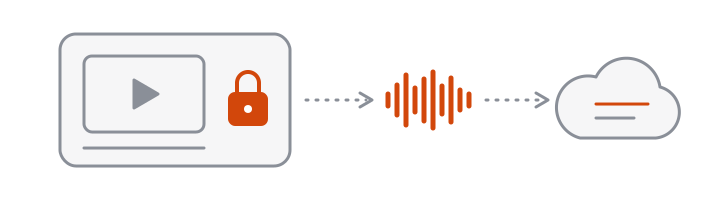
Traditional online subtitle sites ask you to upload the entire MP4 or MOV file and often block anything over 100–200 MB. VoceText separates the audio in your browser first:
- 91.8% smaller uploads in our live test: In our 23 November 2026 benchmark, a 24-minute, 48.0 MB NASA MP4 uploaded only 3.92 MB of compressed Opus audio and finished end-to-end in 55.9 seconds (25.8× real-time) with 4.17% word error rate across 768 ear-audited words.
- Video frames stay private: Faces, slides and screen recordings never leave your machine.
- No heavy local AI model download: Unlike browser-only WebGPU tools that require downloading ~100–800 MB of weights and stall on phones or older laptops, transcription runs in parallel on the server.
Supported video formats and common sources
VoceText reads common video containers directly in your browser without asking you to convert or shrink the file first:
| Video format | Where it usually comes from | Practical note for SRT export |
|---|---|---|
| MP4 | Phones, cameras, YouTube exports, Zoom, Teams & Google Meet recordings | Works across modern desktop and mobile browsers; only the extracted audio track is uploaded (Ogg/Opus where supported, or mono 16 kHz WAV fallback) |
| MOV | iPhone camera recordings, QuickTime & macOS screen recordings | Demuxed directly in the browser without converting to MP4 first; if your browser cannot decode a specialized audio codec, convert or re-export with AAC audio |
| WebM | Browser-based screen recorders and Loom-style captures | Parses the container in the browser and extracts the audio stream locally |
| MKV | OBS Studio recordings and capture software | Parsed directly in the browser; if your browser cannot decode the audio codec (for example AC-3 or Vorbis), remux or convert to MP4 with AAC audio |
Using your SRT file in YouTube and video editors
Once downloaded, the plain UTF-8 .srt file imports cleanly into major platforms and NLEs:
| Platform / Editor | How to import the .srt |
|---|---|
| YouTube Studio | Open Subtitles → select the video → Add language → Upload file → With timing → choose the .srt |
| Adobe Premiere Pro | Drag the .srt into the Project panel (or File → Import), drop it on the Timeline, and style in Window → Text |
| DaVinci Resolve | On the Edit page, go to File → Import → Subtitle…, select the .srt, and adjust styling in the Inspector |
| CapCut Desktop / Web | Open Text → Captions (or Local captions) → Import the .srt to style or export burned-in vertical clips |
| HTML5 web players | Download VTT instead of SRT and attach it with <track kind="captions" src="video.vtt" default> |
For audio-only files, see Audio to SRT. For caption wrapping rules (84-character two-line cues matching Netflix's 42×2 guideline), SRT vs VTT details and standalone vs burn-in editor comparisons, see the Free Subtitle Generator or our 2026 free subtitle generators guide.
What a finished video SRT file looks like
Every cue is numbered with millisecond timestamps (HH:MM:SS,mmm --> HH:MM:SS,mmm) and wrapped at up to 84 characters per cue, preferring natural punctuation breaks:
1
00:00:00,400 --> 00:00:03,850
In this walkthrough, we will import a synced caption track
into Premiere Pro and DaVinci Resolve.

2
00:00:04,100 --> 00:00:07,200
Start by dragging the UTF-8 SRT file onto your timeline.
For multi-speaker videos, Pro speaker identification can optionally prefix speaker changes with Speaker 1: and Speaker 2: (or you can switch labels off in the Download menu before exporting).
What Video to SRT does not do
- Burn captions into the video: You download a clean
.srtor.vttfile and style or burn it in inside your video editor. - Translate subtitles: Captions match the spoken language (20 languages supported).
- Fetch YouTube or social URLs: Upload the video file saved on your device.
Free and Pro limits at a glance
| Without an account | Free account | Pro | |
|---|---|---|---|
| Price | Free | Free | $10/month or $96/year |
| Files per day | 1 | 3 | No daily limit |
| Longest file | 10 minutes | 30 minutes | 10 hours |
| Monthly allowance | Daily limit only | 10 hours | 100 hours |
| Speaker identification | Not included | Not included | Up to 10 hours per month |
| Edit and save transcripts | Not included | Included | Included |
| Download formats | TXT, DOCX, SRT, VTT, JSON | TXT, DOCX, SRT, VTT, JSON | TXT, DOCX, SRT, VTT, JSON |
| Transcripts kept for | 24 hours | 30 days | Until you delete them |
Frequently asked questions
How do I make SRT subtitles from a video for free online?
Drop your MP4, MOV, WebM or MKV video into the tool above, pick the spoken language (or leave auto-detect on) and click Transcribe. Your browser extracts only the audio track, VoceText generates timed captions, and you download a clean UTF-8 .srt file from the Download menu.
Is Video to SRT free without sign-up, credit card or watermark?
Yes. Without an account you can convert 1 video per day up to 10 minutes and download a watermark-free SRT (or VTT) file with no credit card required. A free account raises your allowance to 3 videos per day up to 30 minutes each (10 hours/month) and lets you edit mistakes before exporting.
Is there a video file size limit (MB or GB)?
Limits are based on video duration, not file size: 10 minutes without an account, 30 minutes with a free account and up to 10 hours on Pro. Because your browser separates and compresses only the audio track before upload, a large 1080p or 4K video uploads as a small Opus audio file.
Which plan do I need for a short clip, a 20-minute video or a 1-hour recording?
Under 10 minutes: use Guest mode with no account (1 video/day). 10 to 30 minutes: create a free account (3 videos/day, 10 hours/month). Over 30 minutes (up to 10 hours per video): Pro is $10/month or $96/year with 100 hours/month and no daily file limit.
Does VoceText upload my video or keep it private?
The video picture never leaves your device. Your browser extracts and compresses only the audio track, which is deleted automatically from our servers after 7 days and is never used to train AI models.
Does it burn subtitles directly onto the video?
No. VoceText exports a separate .srt (or .vtt) subtitle file so you keep full control over font, colour and placement in Premiere Pro, DaVinci Resolve, CapCut or YouTube Studio.
Which languages are supported for video to SRT?
20 languages: English, Spanish, Portuguese, German, Italian, French, Dutch, Polish, Swedish, Russian, Ukrainian, Turkish, Arabic, Hindi, Japanese, Korean, Chinese, Vietnamese, Thai and Indonesian, or automatic detection. Subtitles are generated in the spoken language; VoceText does not translate.
Can I make SRT subtitles from a YouTube link?
No. VoceText works with video files on your device (MP4, MOV, WebM, MKV) rather than external links.
Can I edit the subtitle text or timing before downloading?
With a free account or Pro you can correct any misheard name or word in the editor while listening to each timestamp; timing comes from the audio and stays aligned. To shift or stretch cue timing manually, adjust the SRT track in your video editor.